
# Development quickstart
Learn how to search and book a flight with the CitizenPlane (opens new window) API.
Booking a flight only requires four simple steps. Because CitizenPlane processes credit cards but is not authorised to have credit card information, a payment method generated with the Stripe API (opens new window) will be required to process the booking. Upon request and validation, CitizenPlane can also work with a deposit model. CitizenPlane (opens new window) only supports EUR as its currency.
# Testing
You'll be given a sandbox token for the implementation phase & testing process. You can easily search & book test flights using this sandbox token. If you also wish to test the payment step, you can use any of the test cards made available by Stripe (opens new window). No real charge will be induced.
# Complete flow
The search-to-booking flow with the CitizenPlane (opens new window) API is as followed:

- Search for Flights
- (Optional) Search for Round trip fares
- Create a booking request
- (Optional) Gather credit card secured details
- Process the booking
- (Optional) Retrieve booking and flight information
# Step 1: Search flights
Each time a customer is performing a flight search, you can search CitizenPlane's flight content for flights matching your customer's request.
Flight content
Please note that all our flights are non-refundable, non-exchangeable and have no flex fares. We sell both one-way & round trip fares.
Price and Availability Disclaimer
The search step of the Booking API does not guarantee the validity of prices or availability. It relies solely on a cache and should be considered indicative only. To obtain final and accurate pricing and availability, you must proceed with the request and booking steps.
CitizenPlane cannot be held responsible for discrepancies arising from relying solely on the search results.
# Implementation
All the examples below use screenshots from Kiwi.com (opens new window) booking platform.
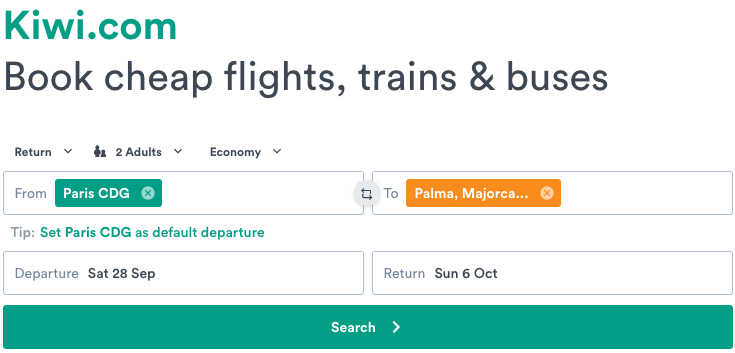
Because the above search is a roundtrip, it should be split into the two following requests to our API:
curl "https://booking-api.citizenplane.com/v3/flights?origin=CDG&destination=PMI&start=2025-08-06&end=2025-08-07&seats=2"
-H "Accept: application/json" \
-H "Authorization: Bearer {your_api_token}"

curl "https://booking-api.citizenplane.com/v3/flights?origin=PMI&destination=CDG&start=2025-08-13&end=2025-08-14&seats=2"
-H "Accept: application/json" \
-H "Authorization: Bearer {your_api_token}"
Go to the API reference
In case of a one-way search, only one request to our API is needed.
# Step 2: Search round trip fares
In addition to one-way fares, some CitizenPlane flights are sold with specific round trip fares. To search for roundtrip-fares, you can use a new, dedicated endpoint: v3/roundTrips
Search flow
Please note that CitizenPlane distributes mostly one-way fares. This step should only be used as an additional, post-search flight step and should not by any means replace the search flight step.
# Implementation
curl "https://booking-api.citizenplane.com/v3/roundTrips?origin=CDG&destination=PMI&start=2025-08-06&end=2025-08-07&returnStart=2025-08-13&returnEnd=2025-08-14&seats=2"
-H "Accept: application/json" \
-H "Authorization: Bearer {your_api_token}"
Go to the API reference
If no fares are returned, then one-way fares returned in step 1 must be used.
# Step 3: Create a booking request
Use the id returned in the flight object to create a booking request. You can specify one or two ids in the flight_ids array parameter. It will simultaneously create as many requests as there are ids specified.
Creating a booking request guarantees your seats and prices (seat & ancillary) for 3 minutes, thus saving you multiple checks to make sure the price hasn't changed or the seats haven't been taken.
Expiration time
A request is a temporary booking object waiting to be fulfilled. If the id of the request hasn't been used to process a booking within these 3 minutes, the request will be considered as expired. Any booking using the id of an expired request will be rejected.
Because checked and cabin bags options can vary between flights, they also have to be linked to their associated flight through the id of each flights. All options must be specified, even if the customer does not select any checked or cabin bags options. In that case, quantity must be set to 0.
# Implementation
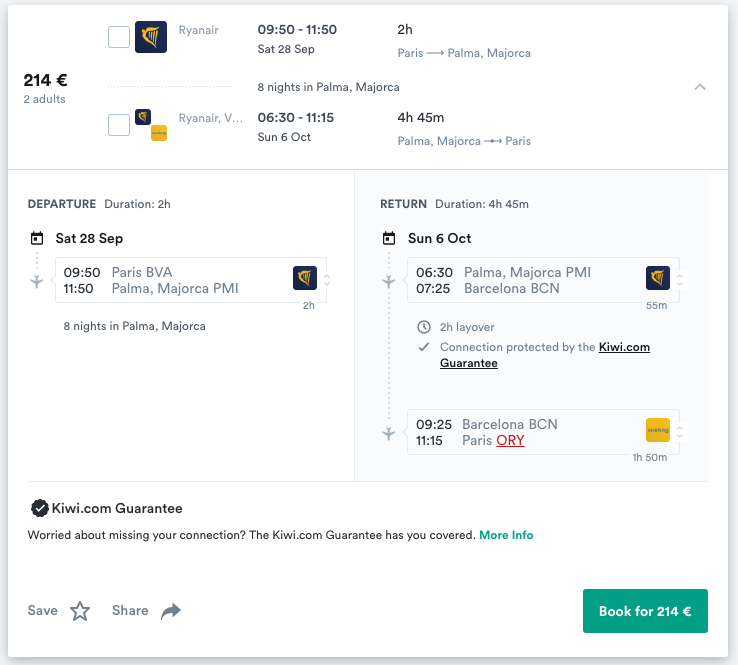
Once the customer clicks on book it should generate the following API call
one-way example request
curl -X POST \
-H 'Content-Type: application/json' \
-H 'Accept: application/json' \
-H 'Authorization: {your_api_token}' \
-d '{
    "flight_ids”: [4014831],
    "passengers": [
        {
            "first_name": "John",
            "last_name": "Doe",
            "gender": "male",
            "date_of_birth": "1970-01-01",
            "passport_number": "ABCDE123",
            "passport_expiry_date": "01/01/2040",
            "nationality": "fr",
            "passport_country_of_issue": "fr"
        },
        {
            "first_name": "Jane",
            "last_name": "Doe",
            "gender": "female",
            "date_of_birth": "1970-01-01",
            "passport_number": "ABCDE124",
            "passport_expiry_date": "01/01/2040",
            "nationality": "fr",
            "passport_country_of_issue": "fr"
        }
    ],
    "bags": {
        "4014831": {
            "checked": [
                {
                    "weight": 20,
                    "quantity": 1
                }
            ],
            "cabin": [
                {
                    "dimensions": {
                        "width": 56,
                        "height": 45,
                        "length": 25
                    },
                    "quantity": 1
                },
            ]
        }
    },
    "fare_type": “one_way”,
    "customer_code": “kiwi”
}' 'https://booking-api.citizenplane.com/v3/requests'
round-trip example request
curl -X POST \
-H 'Content-Type: application/json' \
-H 'Accept: application/json' \
-H 'Authorization: {your_api_token}' \
-d '{
    "flight_ids”: [4014831, 3795943],
    "passengers": [
        {
            "first_name": "John",
            "last_name": "Doe",
            "gender": "male",
            "date_of_birth": "1970-01-01",
            "passport_number": "ABCDE123",
            "passport_expiry_date": "01/01/2040",
            "nationality": "fr",
            "passport_country_of_issue": "fr"
        },
        {
            "first_name": "Jane",
            "last_name": "Doe",
            "gender": "female",
            "date_of_birth": "1970-01-01",
            "passport_number": "ABCDE124",
            "passport_expiry_date": "01/01/2040",
            "nationality": "fr",
            "passport_country_of_issue": "fr"
        }
    ],
    "bags": {
        "4014831": {
            "checked": [
                {
                    "weight": 20,
                    "quantity": 1
                }
            ],
            "cabin": [
                {
                    "dimensions": {
                        "width": 56,
                        "height": 45,
                        "length": 25
                    },
                    "quantity": 1
                },
            ]
        }
        {
        "3795943": {
            "checked": [
                {
                    "weight": 20,
                    "quantity": 1
                }
            ],
            "cabin": [
                {
                    "dimensions": {
                        "width": 56,
                        "height": 45,
                        "length": 25
                    },
                    "quantity": 1
                },
            ]
        }
    },
    "fare_type": “round_trip”,
    "customer_code": “kiwi”
}' 'https://booking-api.citizenplane.com/v3/requests'
Go to the API reference
# Step 4: Gather credit card details (optional)
# For Self PSP integrations
WARNING
You can skip this step if your organization is authorized to use the setting self_psp: true. Refer to the self PSP setting section for more information.
# Generate a payment method
Once the customer has entered its payment information and prior to processing the booking, you'll need to send the credit card information to Stripe (opens new window) to generate a payment method we'll use to process the booking. Because of PCI compliance (opens new window) issues, CitizenPlane cannot directly process credit card information. Therefore, you need to send us a payment_method generated with Stripe along with 3D secure information if needed.
Authentication
To authenticate your request to Stripe, use the Stripe restricted token (appended with sk) we'll assign to you.
# Implementation
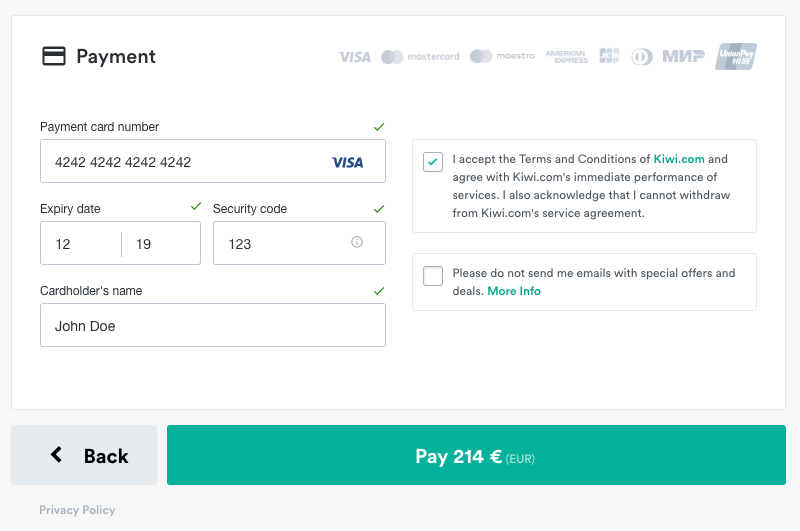
Once the customer clicks on pay it should send the following request to the Stripe API
curl https://api.stripe.com/v1/payment_methods \
-u sk_test_wZGrX11MrIk123a9mpOoL9: \
-d card[number]=4242424242424242 \
-d card[exp_month]=12 \
-d card[exp_year]=2019 \
-d card[cvc]=123 \
-d type=card
Go to the API reference
# Step 5: Process the booking
The payment method returned by Stripe (opens new window) includes a payment id appended by pm that you need to add in your booking payload in order to allow CitizenPlane (opens new window) to process the payment.
# Regarding Self PSP setting
If your organisation is authorised to use self_psp setting, you can omit the payment_method and three_d_secure fields and instead add the key self_psp: true.
To be authorised, please contact tech@citizenplane.com.
# Regarding 3D Secure results
If needed, you can pass 3D Secure results directly at this stage to ensure you won't have failed bookings. 3D Secure results should be formatted as follow:
| Field | Description | Possible Values |
|---|---|---|
| three_d_secure.version REQUIRED | The version of 3D Secure that was performed. | - 1.0.2 - 2.1.0 - 2.2.0 |
| three_d_secure.electronic_commerce_indicator REQUIRED | The Electronic Commerce Indicator (ECI) is returned by your 3D Secure provider and indicates what degree of authentication was performed. Note: If your provider returns an ECI of 07 or 00, please discard it: authentication has failed. If desired, you may make an unauthenticated payment by leaving three_d_secure unset. | - 05: Fully authenticated. The customer likely proved their identity to the issuing bank. - 06: Attempt acknowledged. The customer, or the entire issuing bank, is not set up for 3D Secure. Or the issuing bank is experiencing an outage. CitizenPlane will return a payment error in that case. - 01: Attempt acknowledged (Mastercard variant). CitizenPlane will return a payment error in that case. - 02: Fully authenticated (Mastercard variant). |
| three_d_secure.cryptogram REQUIRED | The cryptogram, also known as the "authentication value" (AAV, CAVV or AEVV). This value is 20 bytes, base64-encoded into a 28-character string. Most 3D Secure providers will return the base64-encoded version, which is what you should specify here. | - |
| three_d_secure.transaction_id REQUIRED | For 3D Secure 1, the XID. For 3D Secure 2, the Directory Server Transaction ID (dsTransID). | - |
Each booking payload has to be linked with up to two requests with the request_ids array parameter containing the different ids. You must also pass the customer's information with a required customer_code string.
Identify the customer
The customer is always the entity whose card is used to process the booking. Only VCCs or B2B cards should be used.
Though optional, it is highly recommended that you add a unique external_id in order to be able to trace back the booking in our system.
curl -X POST \
-H 'Content-Type: application/json' \
-H 'Accept: application/json' \
-H 'Authorization: {your_api_token}' \
-d '{
  "request_ids”: [244401, 244402],
  "customer_code": "kiwi",
  "external_id": "ABC123",
  "first_name": "John",
  "last_name": "Doe",
  "gender": "male",
  "email": "john.doe@example.com",
  "phonenumber": "+33600000000",
  "payment_method": "pm_1IxrDoCLoBt04Rh8deU0seLG",
  "three_d_secure": {
    "version": "2.2.0",
    "electronic_commerce_indicator": "05",
    "cryptogram": "4BQwsg4yuKt0S1LI1nDZTcO9vUM=",
    "transaction_id": "f879ea1c-aa2c-4441-806d-e30406466d79"
  }

  "self_psp": true // TO USE ONLY IF YOUR TEAM IS AUTHORIZED TO APPLY THIS SETTING

}' 'https://booking-api.citizenplane.com/v3/bookings'
Go to the API reference
# Step 6: Retrieve booking and flight information
# Implementation
If you wish to retrieve booking information and most importantly, the latest flight information attached to the booking, you can use the below endpoint. This endpoints allows you to check for potential schedule changes and automatically process them.
curl 'https://booking-api.citizenplane.com/v3/bookings?cp_reference=CPKVLF' \
-H 'Accept: application/json' \
-H 'Authorization: {your_api_token}'
Go to the API reference